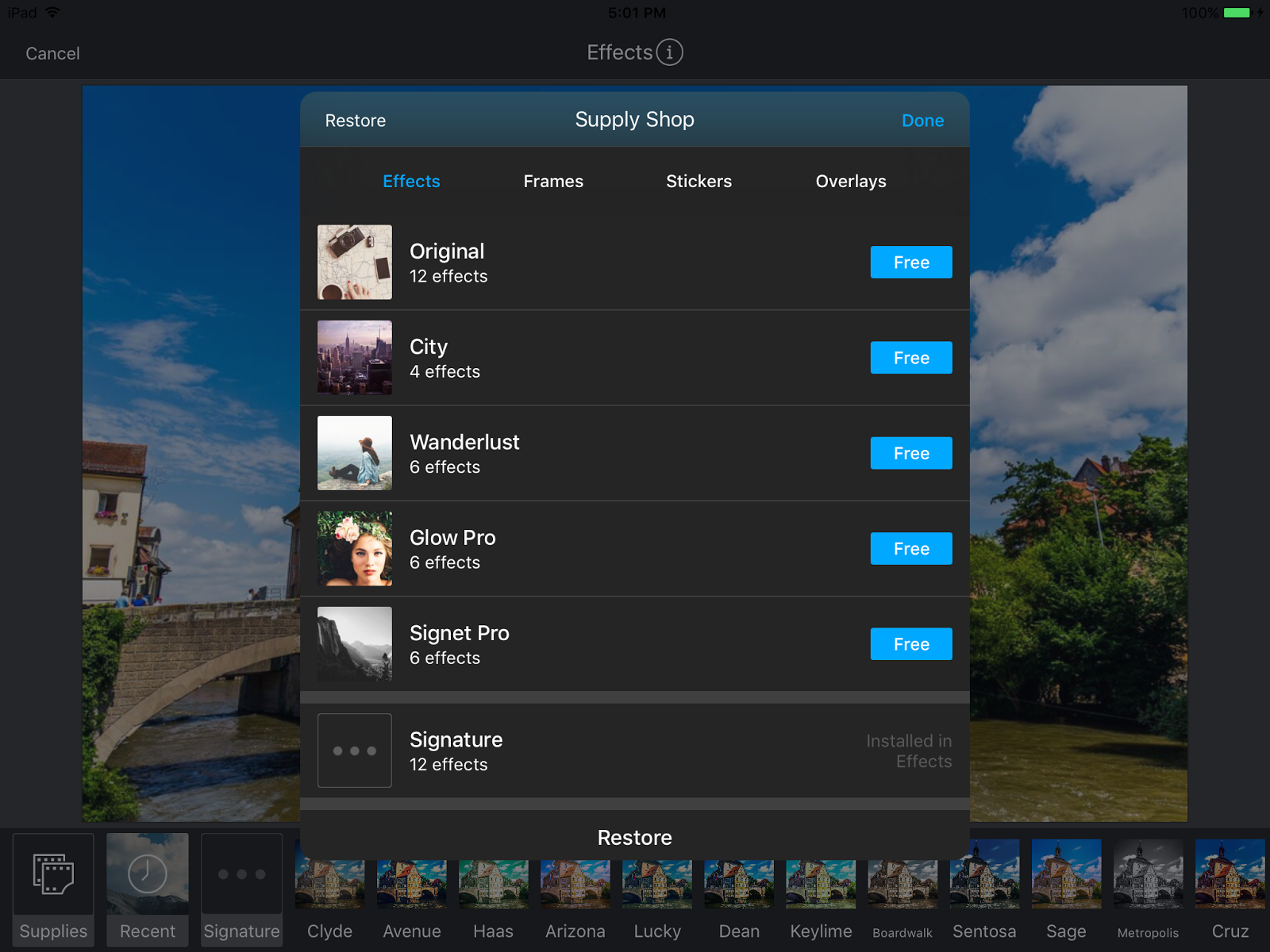
TouchAppCreator v2.9 integrates with new version of image editor supported by Adobe Creative Cloud.
More effects, frames, stickers, and overlays can be downloaded within TouchAppCreator for free.
More detail is here.
Friday, August 26, 2016
Thursday, August 25, 2016
TouchAppCreator v2.9
New features:
1. Move and copy group
2. Create footnotes
3. Upload app zip to Google Drive, Dropbox, Box, FTP Server
4. Share photos, video, audio or text from other apps into TouchAppCreator using Share Extension
5. Insert subscript and superscript
6. Convert Table To Rich Table
7. Convert List To Rich Table
8. Fix the problem of external keyboard
9. New version of image editor
10. UI enhancement for photo picker
11. UI enhancement of resource library
12. Bug fix
1. Move and copy group
2. Create footnotes
3. Upload app zip to Google Drive, Dropbox, Box, FTP Server
5. Insert subscript and superscript
6. Convert Table To Rich Table
7. Convert List To Rich Table
8. Fix the problem of external keyboard
9. New version of image editor
10. UI enhancement for photo picker
11. UI enhancement of resource library
12. Bug fix
Tuesday, August 9, 2016
Your App Distribution
Google will discontinue web hosting support in Google Drive by August 31st, 2016. Please refer to this page: https://googleappsdeveloper.blogspot.com/2015/08/deprecating-web-hosting-support-in.html
We suggest you to distribute your app in the following ways:
1. TouchAppViewer
TouchAppCreator generates the zip file for distribution by default. First, TouchAppCreator uploads app zip file to any cloud storage. Your audience can download TouchAppViewer app (it is free) to import your app zip file.
2. Your web hosting server
TouchAppCreator uploads your app to your web server via FTP.
3. View app in browser
Your audience can unzip the file and double click the main page (index.html) to start your app using any browser.
Thursday, June 16, 2016
Build Your Own Widgets
We are so excited to launch Creative Widget Builder app to let anyone build amazing widgets. All the generated widgets are easily imported into your apps. CWB also works with TouchAppCreator, iBooks Author and Creative Book Builder.
At the first launch, CWB supports 5 types of widgets: Flash Card, Fill In The Blank, Matching Question, Sorting Question, and Interactive Image. Each widgets can be customizable in many ways. For more details, please visit CWB home page: https://getcwb.blogspot.com.
Why Creative Widget Builder?
CWB generates widget file with extension "wdgt" that is based on iBooks Widgets. It makes your widgets portable and reusable. You can focus on widget building on CWB and reuse widgets within apps. You can also play widgets within CWB directly by switching to play mode.
It is just beginning. We will add more widgets in the future release. Please suggest us your favorite widgets on our forum.
How to insert widget into TouchAppCreator? (Please update the latest version of TouchAppCreator)
1. Open widget in CWB
2. Tap action button to select Open In...
3. Select TouchAppCreator
4. Go to CBB, widget is saved to Resources Library
5. Go to the page, tap Resources Library, select the widget
OR
1. Go to the page in TouchAppCreator
2. Tap + button and then select External Widget
3. Select one of the cloud services
4. Select widget zip file
5. Tap import button to import the file
At the first launch, CWB supports 5 types of widgets: Flash Card, Fill In The Blank, Matching Question, Sorting Question, and Interactive Image. Each widgets can be customizable in many ways. For more details, please visit CWB home page: https://getcwb.blogspot.com.
Why Creative Widget Builder?
CWB generates widget file with extension "wdgt" that is based on iBooks Widgets. It makes your widgets portable and reusable. You can focus on widget building on CWB and reuse widgets within apps. You can also play widgets within CWB directly by switching to play mode.
It is just beginning. We will add more widgets in the future release. Please suggest us your favorite widgets on our forum.
How to insert widget into TouchAppCreator? (Please update the latest version of TouchAppCreator)
1. Open widget in CWB
2. Tap action button to select Open In...
3. Select TouchAppCreator
4. Go to CBB, widget is saved to Resources Library
5. Go to the page, tap Resources Library, select the widget
OR
1. Go to the page in TouchAppCreator
2. Tap + button and then select External Widget
3. Select one of the cloud services
4. Select widget zip file
5. Tap import button to import the file
Sunday, May 8, 2016
TouchAppViewer v1.3
New Features:
1. Delete multiple items
2. Sort items
3. Search items by keywords
TouchAppCreator v2.8
New features:
1. New Element: Shapes (rectangle, circle, ellipse, star, etc.)
2. New Element: Checklist (list item with checkbox)
3. New Element: Rich Table (more customized table with images)
4. New Element: Table Of Contents
5. Add screen recording to explain everything within the app (for iOS 9 only)
6. Trim video
7. Change font style
8. Add custom font
9. Default alignment and font settings
10. Import external widgets
11. View trash of all web apps in one interface
12. Fix image editor issues
Monday, October 5, 2015
TouchAppCreator v2.7
New features:
1. Speed up the process of updating web app to Google Drive (only upload modified files)
2. Insert embed html or iframe element
3. Embed Google Forms easier
4. Create 360 degree image slider
5. Support panorama image
6. Generate zip file of web app files for easier distribution
7. Import zip file of web app files
8. Allow more than one slideshow on the same page
9. Photo Picker Enhancement: group by day, month, year, size, and orientation, list view with detail information
10. Add True & False Question quickly
11. Marker is added on map
Subscribe to:
Posts (Atom)